
Features

The whole back office, in one set of books.

BeanDish gives small and medium businesses that buy, stock and sell — distributors, wholesalers, online sellers — inventory with true costs, orders from the online store, invoices that get paid online, bills that read themselves, and real double-entry accounting underneath all of it.
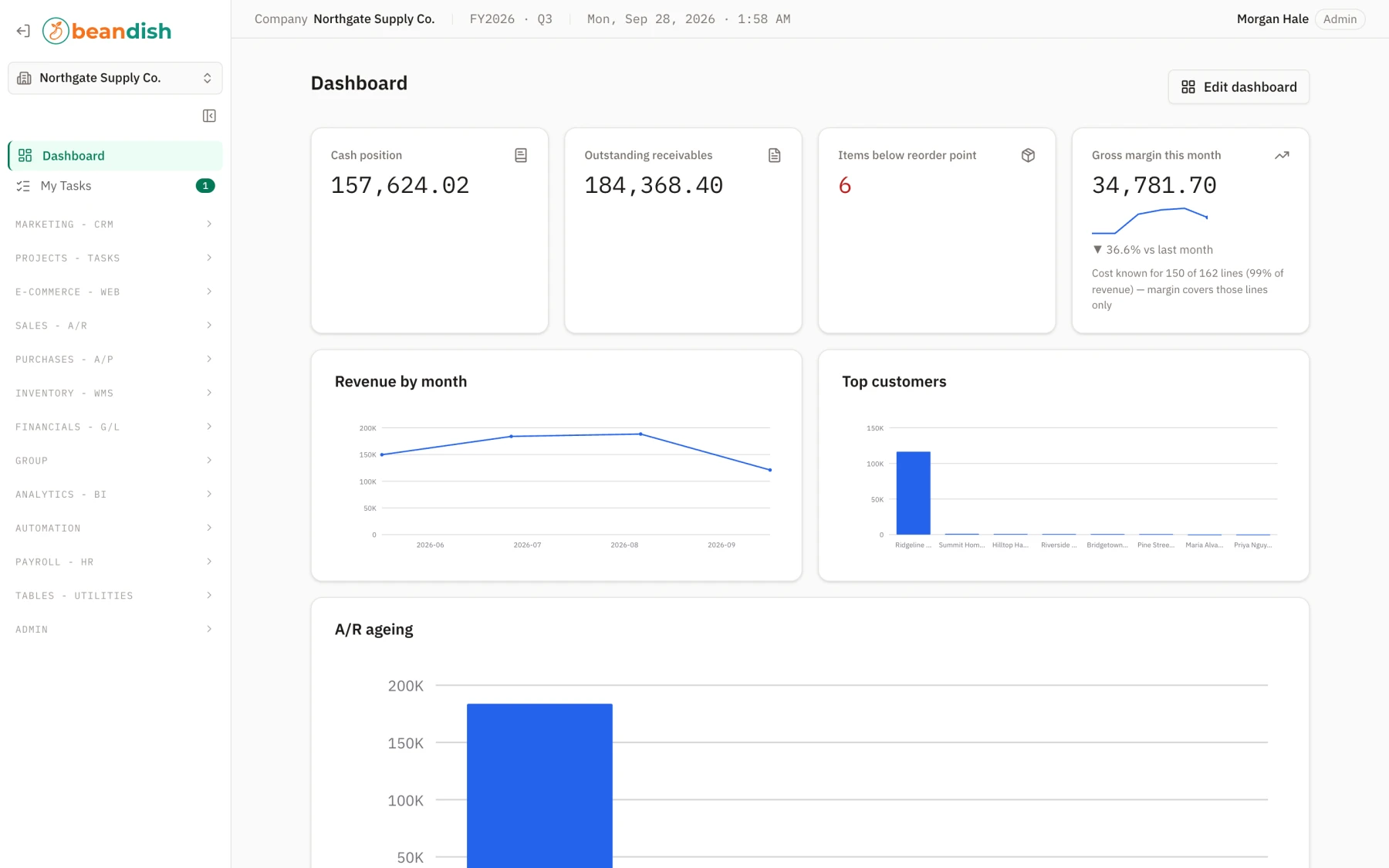
app.beandish.com — Northgate Supply Co. · Dashboard
The BeanDish dashboard: KPI tiles for cash, receivables, items below reorder and gross margin above revenue charts, open tasks and recent activity
Inventory – WMS

Inventory that knows what it cost.

Every receipt opens a cost layer and every issue draws one down, so the value on the balance sheet is the value on the shelf. Pick FIFO, LIFO, average or standard per item, track lots and bins, and roll freight and duty into the stock that carried them.
  • FIFO, LIFO, average, standard and specific-identification costing, chosen per item
  • Warehouses, bins, lot tracking, barcode labels and blind count sheets
  • Kits, work orders and breakdowns, with MRP that raises requisitions
  • Landed cost allocated onto the purchase order's cost layers
Included in every plan
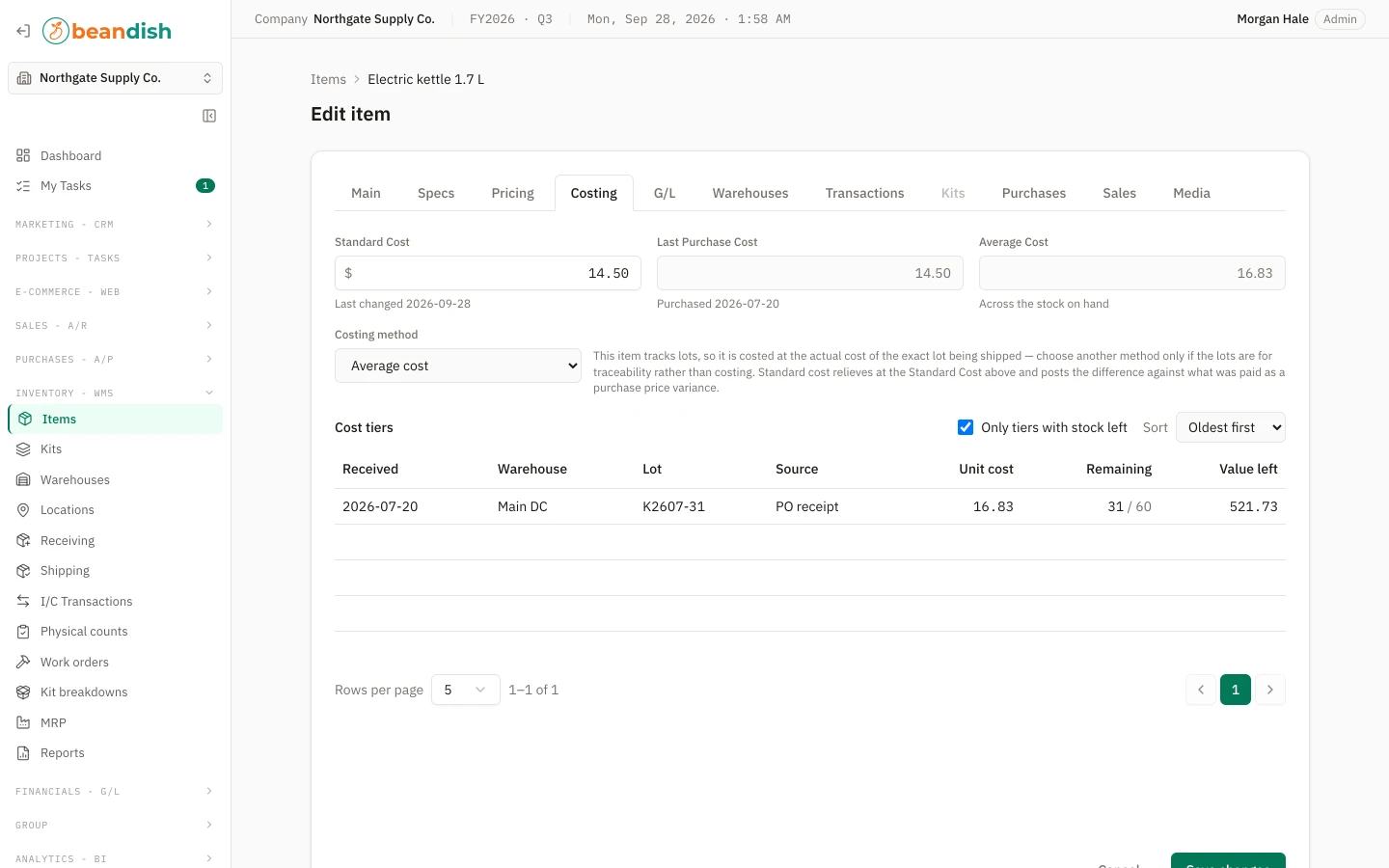
Inventory › Items › Costing
An item's Costing tab showing standard, last purchase and average cost above a table of open cost layers
An item's Costing tab: three costs, and the layers behind them.
E-commerce – Web

Your online store, booked automatically.

Connect a Shopify store and every order lands as a sales order: buyer matched to a customer, lines matched to items, the storefront's tax kept exactly as it was charged. Available stock and tracking numbers travel back the other way.
  • Orders in by webhook and a 15-minute poll, auto-approved if you choose
  • Stock levels pushed to the store from the warehouses you pick
  • Despatches and tracking sent back, so the store e-mails the buyer
  • Marketplace-remitted tax split from the tax you owe
Shopify today · WooCommerce and a storefront API next
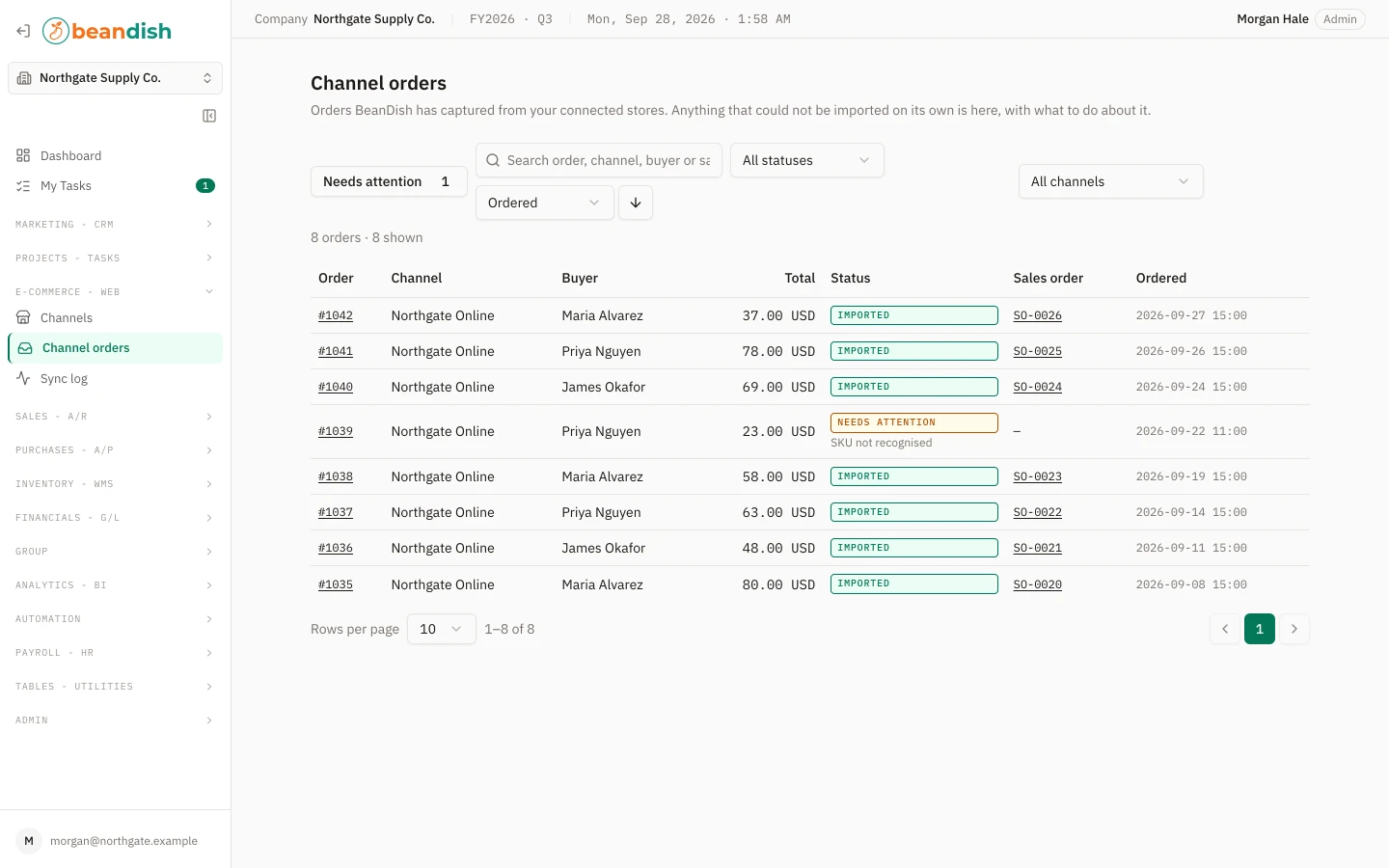
E-commerce › Channel orders
The Channel orders list: eight Shopify orders with their sales order numbers and sync states, one flagged as needing attention
Channel orders: each one already a sales order, with anything that needs a person flagged.
Sales – A/R and payments

Order to cash, and actually getting paid.

Sales orders become shipments become invoices, each line priced from your price lists and contract prices with its source stamped on it. The invoice e-mail carries a Pay online button; customers pay by card or bank, save a method, or switch on autopay through a passwordless portal.
  • Price lists, quantity tiers, percentage rules and per-customer contract prices
  • Partial shipments, packing lists and branded order and invoice PDFs
  • Pay links, a customer portal and autopay, through your own Stripe account
  • Statements, aging, and a sales and margin analysis whose chart prints
Online payments use your own Stripe account
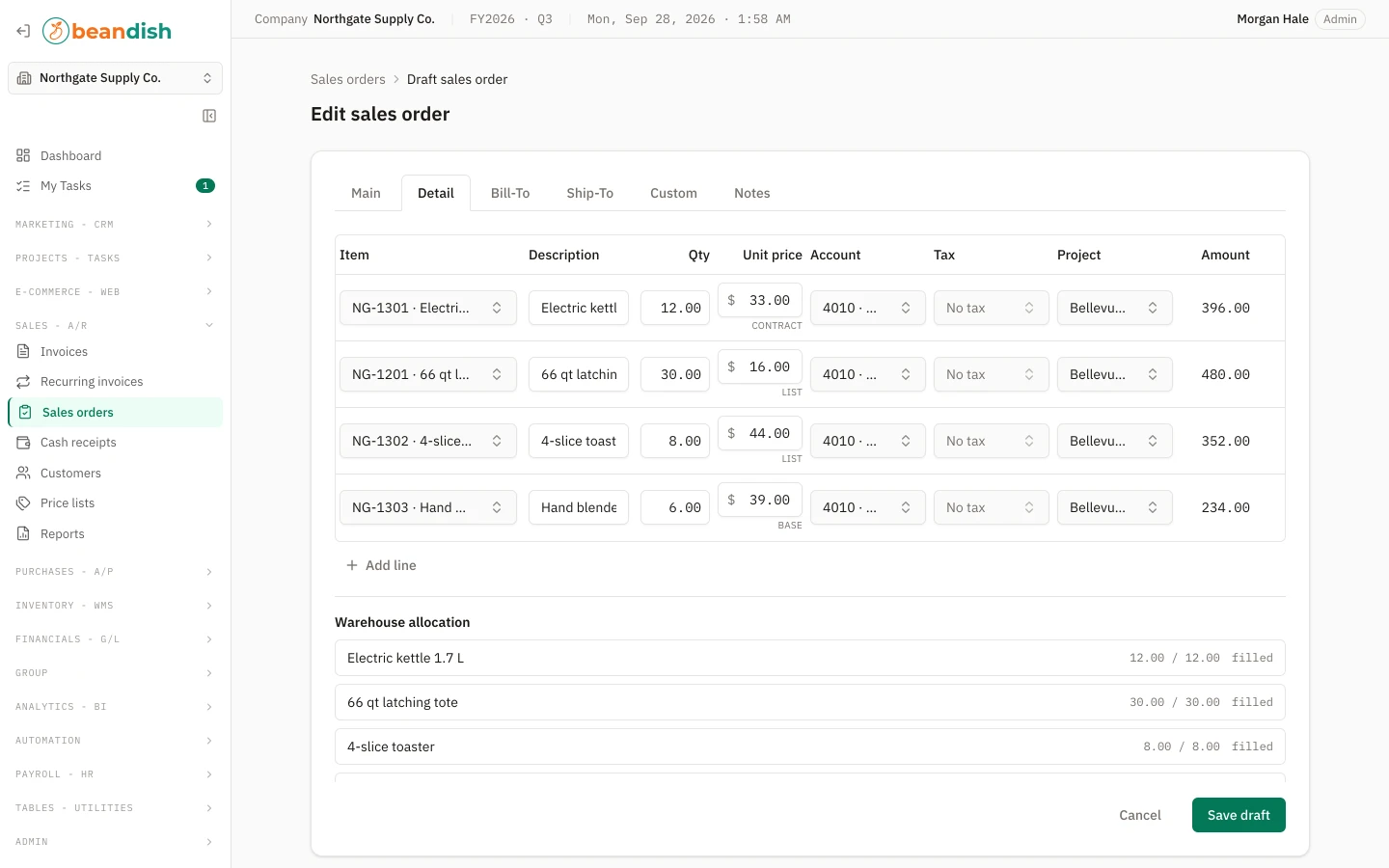
Sales › Sales orders › Edit · Detail
A draft sales order for a retail chain in the editor, each line's unit price stamped with where it came from: a contract, the price list, or the item's base price
A sales order in the editor: every line says where its price came from.
Purchases – A/P

Purchasing without the typing.

Drop a supplier's PDF on the page, or forward it to your capture address, and it comes back as a draft bill beside the original for a person to check. Purchase orders, receipts, landed costs, payment runs with a second approver and 1099s follow the same paperwork.
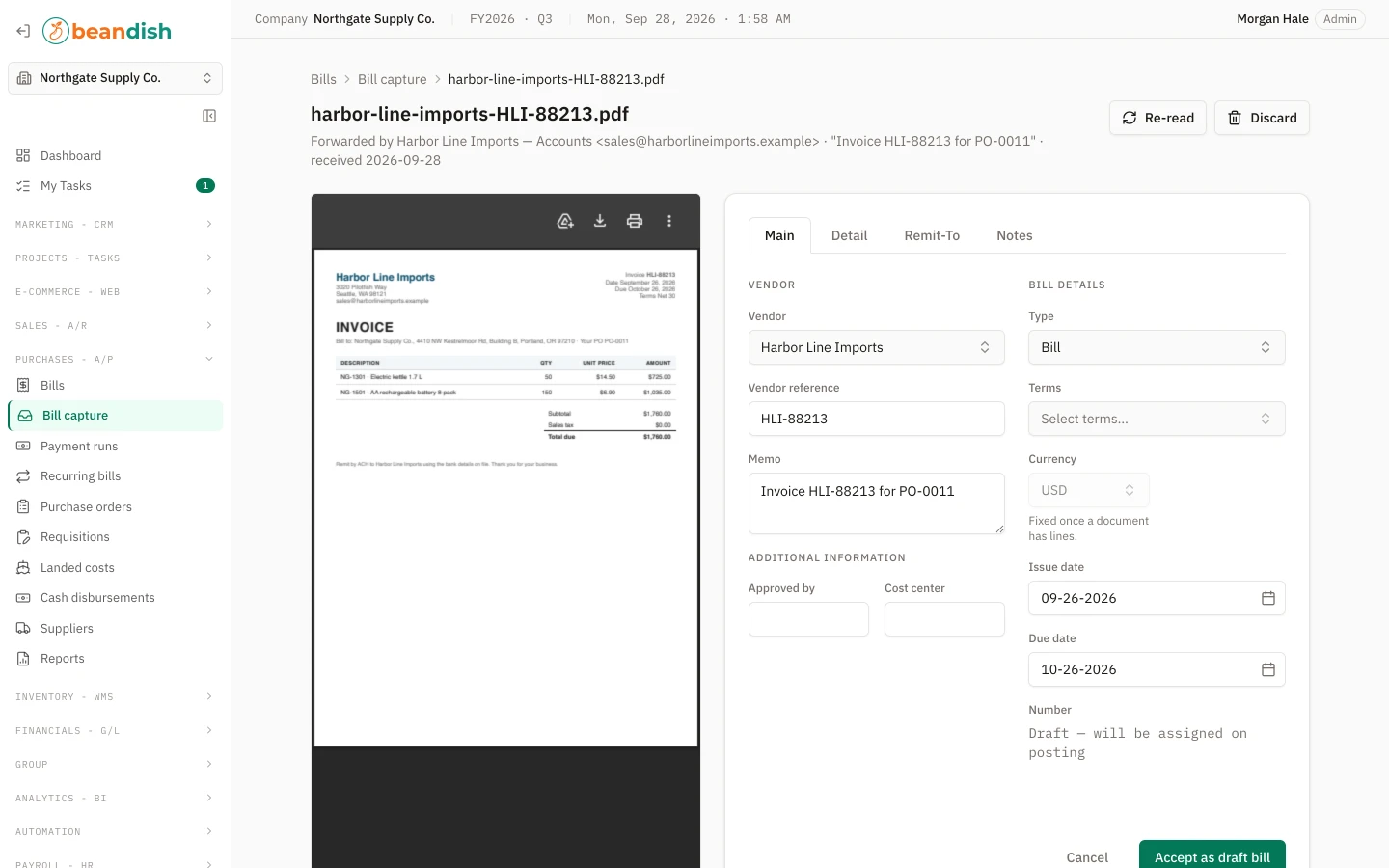
  • AI bill capture from e-mail or PDF, read with your own provider key; nothing posts by itself
  • Purchase orders from requisitions or from MRP, received in parts
  • Payment runs that pay several bills at once, with optional second-person approval
  • Landed costs, purchase price variance and 1099 recipient copies
AI uses your own provider key
Purchases › Bill capture › Review
Bill capture review: the supplier's PDF on the left and the draft bill it became on the right
Bill capture: the supplier's document on the left, the draft it became on the right.
Financials – G/L

Real double-entry accounting underneath.

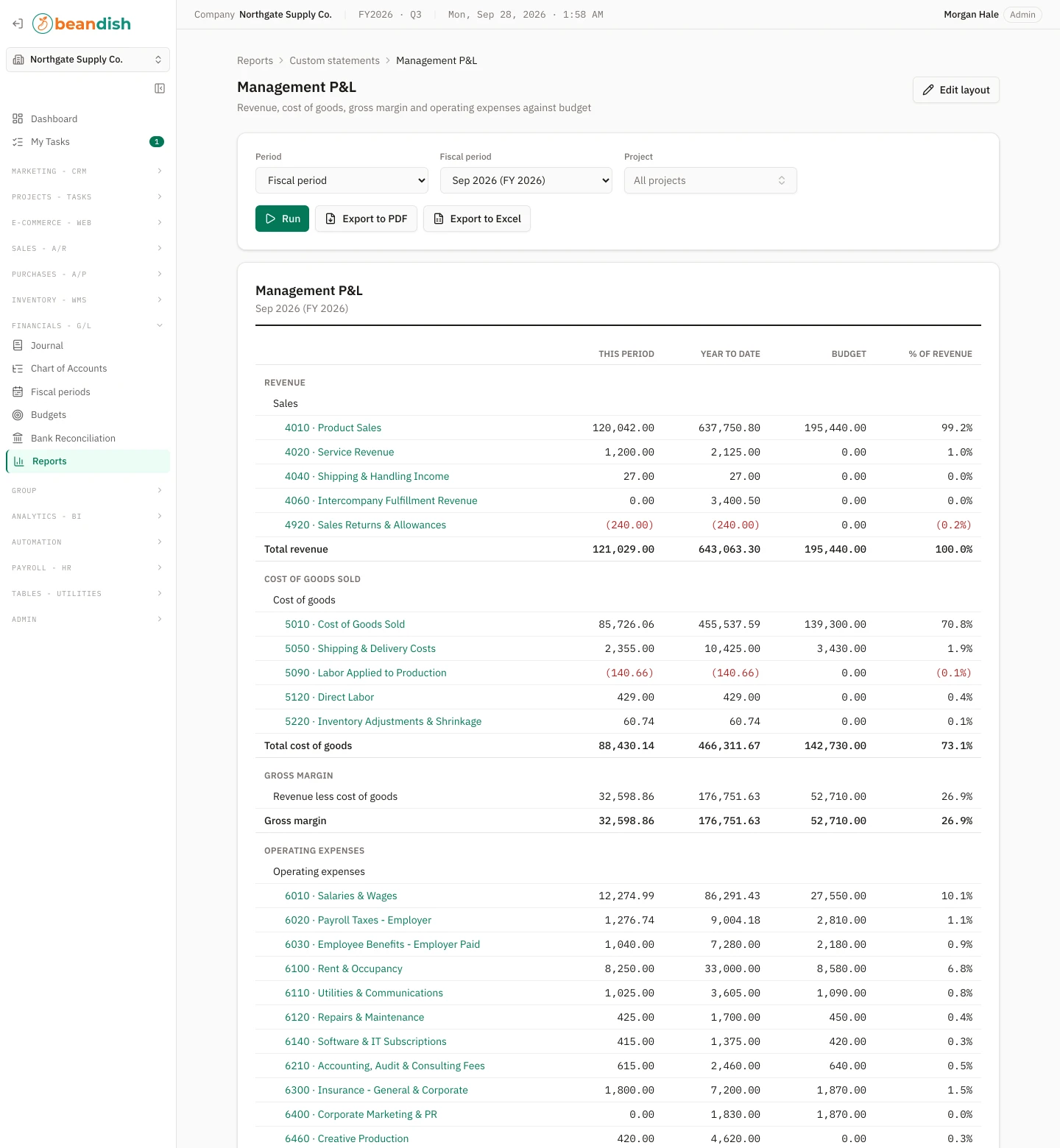
Every invoice, bill, payment, stock movement and payroll run posts a balanced entry to an append-only journal. Periods lock, the year closes, bank feeds reconcile, and the statements come out the way your accountant expects — or the way you design them.
  • Chart of accounts, fiscal periods, lock dates and year-end close
  • Bank reconciliation with statement import and Plaid feeds
  • Budgets by account and period, with budget versus actual
  • A statement designer, and "Ask for a report" in plain words
Included in every plan
Financials › Reports › Custom statements
A custom Management P&L layout run for the current period with this-period, year-to-date, budget and percent-of-revenue columns, ending in net income
A custom P&L layout: this period, year to date, budget and percent of revenue.
Automation and AI agents

Workflows run the routine. Agents draft the rest.

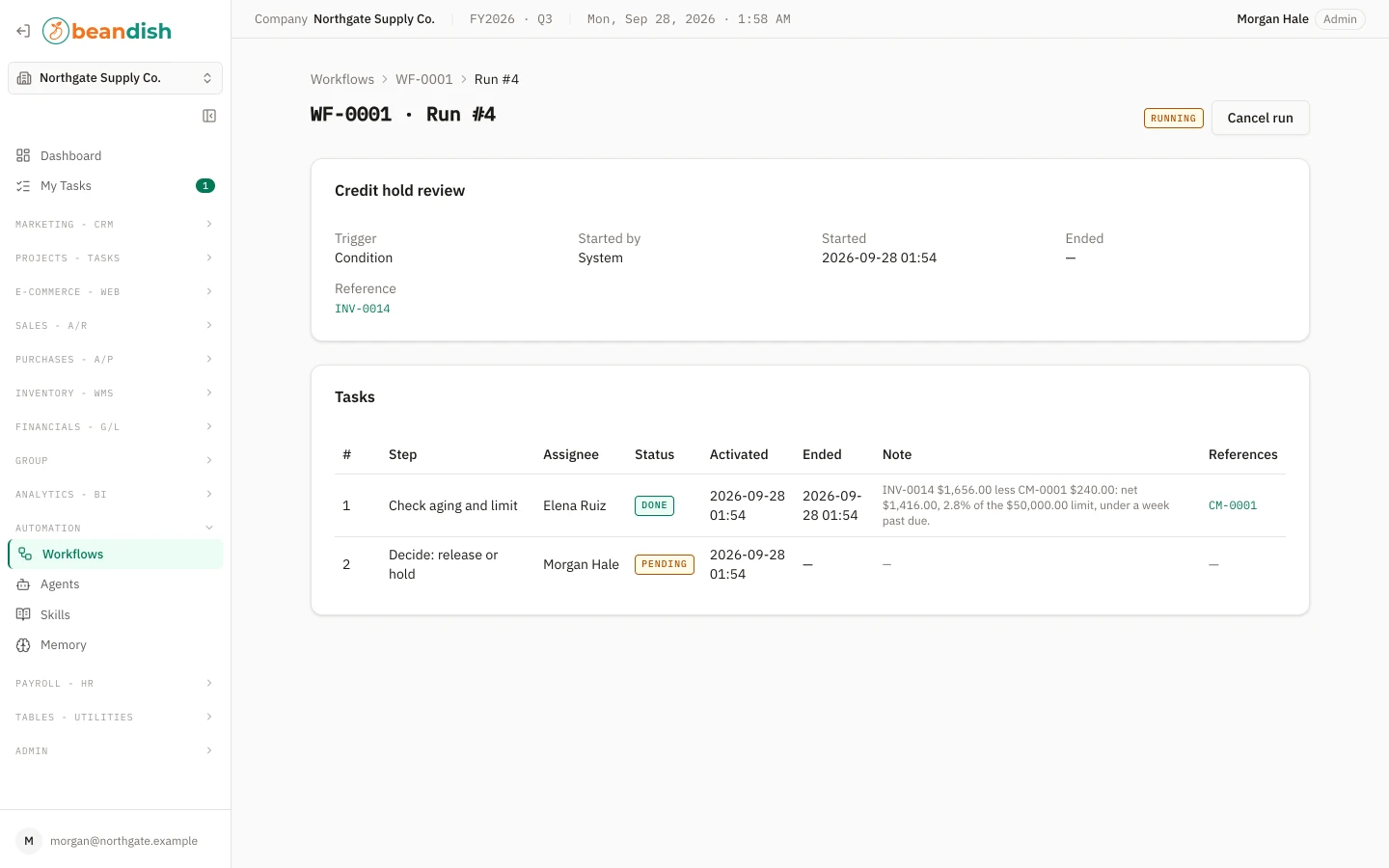
Give a repeatable process ordered steps and owners, then start it by hand, on a schedule, when something happens in the books, or from a webhook. Put a named AI agent on a step, with exactly the permissions an admin grants it, and it reads your data and drafts requisitions or leads for a person to approve.
  • Triggers on more than twenty events, from invoice posted to channel order needing attention
  • A My Tasks inbox, reject-back-to-step, and full run history
  • Agents with their own permission matrix, model choice, budgets and guardrails
  • Reusable skills: markdown instruction documents attached in order
Manual workflows on Starter; events, schedules and agents on Growth and Enterprise
Automation › Workflows › Run
A workflow run showing its ordered steps, who completed each one and the task now waiting
A workflow run: who has done what, and whose turn it is.

Every module, in every plan

Twelve modules behind one login. Multi-company consolidation, scheduled reports and predictions need Growth or Enterprise. Here is what each one holds.

Sales – A/R

Orders, shipments, invoices and the cash that follows.

  • Typed, numbered invoices and credit memos
  • Price lists, tiers and contract prices
  • Recurring invoices
  • Customer statements, aging, sales and margin analysis
More information

Purchases – A/P

From requisition to paid bill, with the paperwork attached.

  • POs, receipts, bills and debit memos
  • AI bill capture from e-mail or PDF
  • Payment runs with second-person approval
  • Landed costs and 1099s
More information

Inventory – WMS

Stock, cost and the work that moves it.

  • Items with specs, media, lots and per-warehouse policies
  • Kits, work orders and breakdowns
  • Physical counts with blind sheets
  • MRP and time-phased projections
More information

E-commerce – Web

Your store's orders, stock and tracking, in sync.

  • Shopify connected in minutes
  • Orders in, stock and fulfilment back
  • Marketplace tax handled
  • Sync log with job control
More information

Financials – G/L

The ledger everything else posts to.

  • Journal, chart, periods, year-end close
  • Budgets and budget vs actual
  • Bank reconciliation and Plaid feeds
  • Statement designer, Ask for a report
More information

Group (multi-entity)

Several companies, one consolidated view.

  • Consolidated P&L, balance sheet and cash flow
  • Intercompany entries posted to both sides
  • Account map across differing charts
  • Per-company worksheet and Excel export
More information

Analytics – BI

Ask the data a question without leaving the books.

  • Inquiry builder over seven transaction views
  • Scheduled reports and alerts by e-mail
  • OData feed for Excel and Power BI
  • Predictions from your own rows
More information

Automation

Processes with owners, deadlines and history.

  • Workflows started by hand, event, schedule or webhook
  • My Tasks inbox
  • AI agents with minted permissions
  • Reusable skills
More information

Marketing – CRM

Leads, campaigns and where the business came from.

  • Lead pipeline with convert-to-customer
  • Campaign attribution and budget vs actual
  • Salesforce pull and Clay push
  • Prospecting map add-on (The Wurld)
More information

Projects – Tasks

What a project really cost, from tagged ledger lines.

  • Costing projects on every document line
  • Numbered tasks with planned resources
  • Recorded work and posted cost
  • Budget vs actual per project
More information

Payroll – HR

Employees and the pay run's journal entry.

  • Employee master
  • Pay-run import from your provider's CSV
  • Balanced posting through your mapping
  • Register, summary and earnings reports
More information

Admin & Tables

The settings a system of record needs.

  • Roles per area, activity log, invitations
  • Document types with their own numbering
  • Import and export, transaction exports
  • Five user-defined fields on eight record types
  • Backup you download and keep
More information

Built like the system of record it is

Row-level security

Every company's rows isolated in the database itself.

Backups you keep

Download and verify a full archive; nothing stays on our servers.

Roles per area

None, read or write across thirteen areas.

Multi-currency

Documents in EUR, GBP, CAD … on a USD ledger.

Sales tax

Stripe Tax on your own account, off until you switch it on.

Paper when you need it

Branded PDFs and Excel for every document and report.

What changes between plans

Every module is in every plan. Multi-company consolidation, scheduled reports and predictions need Growth or Enterprise. Tiers differ in how much of your business they hold.

Starter

Users
2
Companies
1
Online stores
1
Warehouses
1
Channel orders a month
500
Automation
Manual workflows
Prospecting map (The Wurld)
Not included
Support
Standard

Growth

Users
10
Companies
3
Online stores
3
Warehouses
3
Channel orders a month
5,000
Automation
Events, schedules, 3 agents
Prospecting map (The Wurld)
Not included
Support
Standard

Enterprise

Users
100
Companies
Unlimited
Online stores
Unlimited
Warehouses
Unlimited
Channel orders a month
Unlimited
Automation
Unlimited workflows and agents
Prospecting map (The Wurld)
Included
Support
Priority

Need more? Seat packs of 5 users on any plan; an extra company, online store or warehouse on Growth — all from your account page. AI features use your own provider key; online payments use your own Stripe account.

Ready to run stock, orders and books in one place?